Troubleshooting
OCCASIONALLY CLEAN YOUR TOUCHPAD!
Every once and a while the touchpads need to be wiped off, preferably with a soft cloth and some alcohol and then replug in the pad, it is just normal use of the fingers getting moisture on the surface
Easy fixes for most issues if touchpad starts acting funny. First obvious things would be to replug in the pad and see if that fixes if not clean off the surface of the pad with alcohol or like solution. Try to have it plugged directly into the computers USB port and not a USB hub with a bunch of ports going into one. If possible try it on another machine and see if it is the same. you could also try to restart the computer.
Feel free to contact us (212) 677-2235 or sales@ergonomictouchpad.com
Additional Software
Click here to download the free control center software for Windows 10 (64 bit)
Instruction Sheets
Click here to download the Ergonomic Touchpad instruction sheet
Click here to download the Mini Ergonomic Touchpad instruction sheet
Click here to download the Ergonomic Touchpad Button instruction sheet
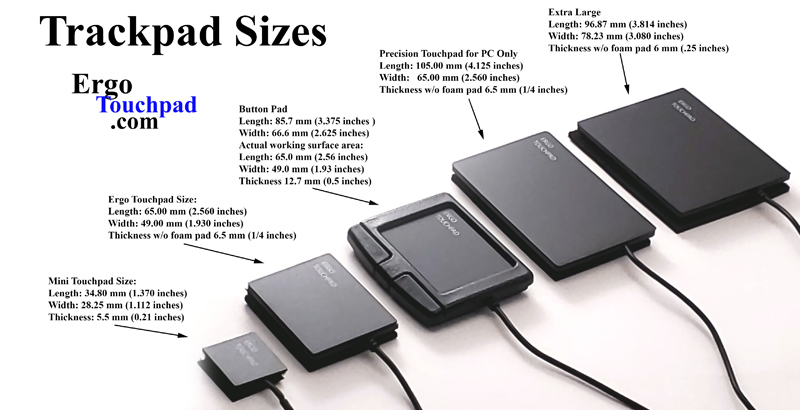
Mini Touchpad:
Part #: USB ETP001MTPUSB
Part #: PS2 ETP001MTPPS2
Length: 34.80 mm (1.370 inches)
Width: 28.25 mm (1.112 inches)
Thickness: 5.5 mm (0.21 inches)
Ergo Touchpad:
Part #: ETP001ETP
Length: 65.00 mm (2.560 inches)
Width: 49.00 mm (1.930 inches)
Thickness w/o foam pad 6.5 mm (1/4 inches)
Button Touchpad:
Part #: ETP001BTP
Length: 3.375 inches (85.725 mm)
Width: 2.625 inches (66.675 mm)
Actual working surface area:
Length: 2.56 inches (65.0 mm)
Width: 1.93 inches (49.0 mm)
Thickness 0.5 inches (12.7 mm)
Precision Touchpad for PC Only:
Part #: ETP001PTP
Length: 65.00 mm (2.550 inches)
Width: 105.00 mm (4.125 inches)
Thickness w/o foam pad 6.5 mm (1/4 inches)
Extra Large Touchpad:
Part #: ETP001ELTP
Length: 96.87 mm (3.814 inches)
Width: 78.23 mm (3.080 inches)
Thickness w/o foam pad 6 mm (.25 inches)